Doomsday Computer puts Wikipedia, medical references, repair manuals, maps with directions and an AI that reads all of it on one laptop or desktop computer. Nothing on it needs a connection. Built for the week the power is out, and for the day the network never comes back.
This is a working preview of the real interface, running in your browser. The answers are real answers recorded from the machine. Click anything.
What you would look up
The questions don't stop when the network does.
We take the answers for granted because they are one search away. Doomsday Computer keeps the search, the books and the maps on a drive in your hands.
Day 3 · Wildfire evacuation
The towers burned with the hillside.
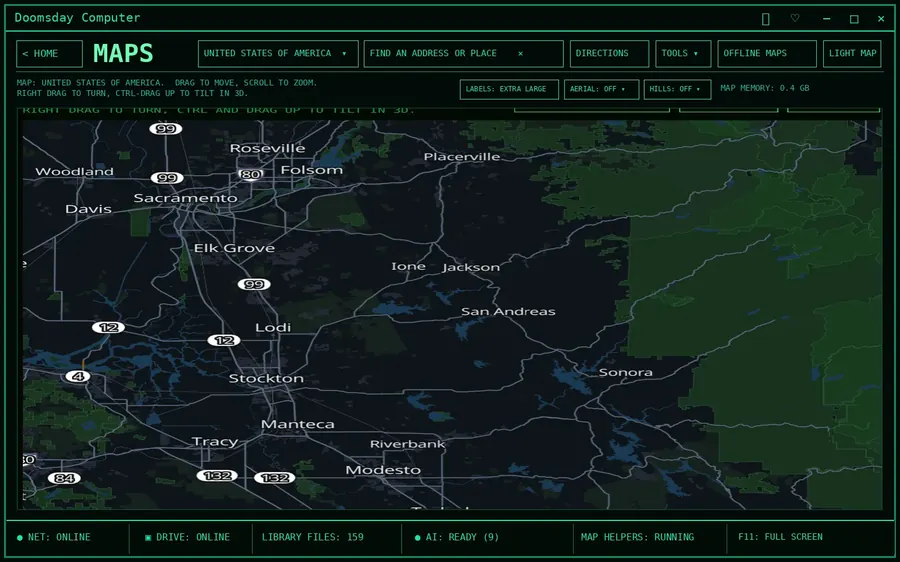
You need the way out that avoids the closed highway, and the nearest hospital that is still open. The maps work, the directions work, the list of local services is already on the machine.
> directions to the county hospital, avoid the closed highway
Week 2 · Grid down
Someone has a fever that won't break.
No pharmacist, no nurse line, no search engine. Ask the AI and it answers from WikiMed, MedlinePlus and the military medicine manuals, with the exact pages it used.
> fever in an adult, no medication available, when is it dangerous
Year 1 · Nobody is coming
Water, food, power, radio, school.
Everything our civilization wrote down about growing, building, healing and teaching, still readable and still searchable. For rebuilding, or for keeping going.
> how to build a slow sand filter for a household
What's inside
Seven tools. One screen each.
The home menu is the whole product. No nested apps, no settings maze. Pick a number and go. Click a tile to see the full screen.
1 · LIBRARY
Wikis and reference books
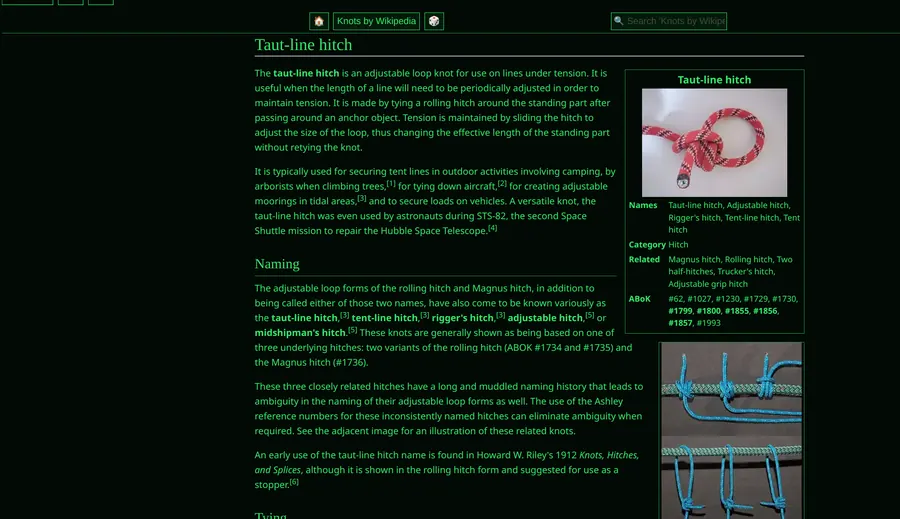
164 curated collections read in a clean page, with search across all of them at once.
2 · CHAT WITH AI
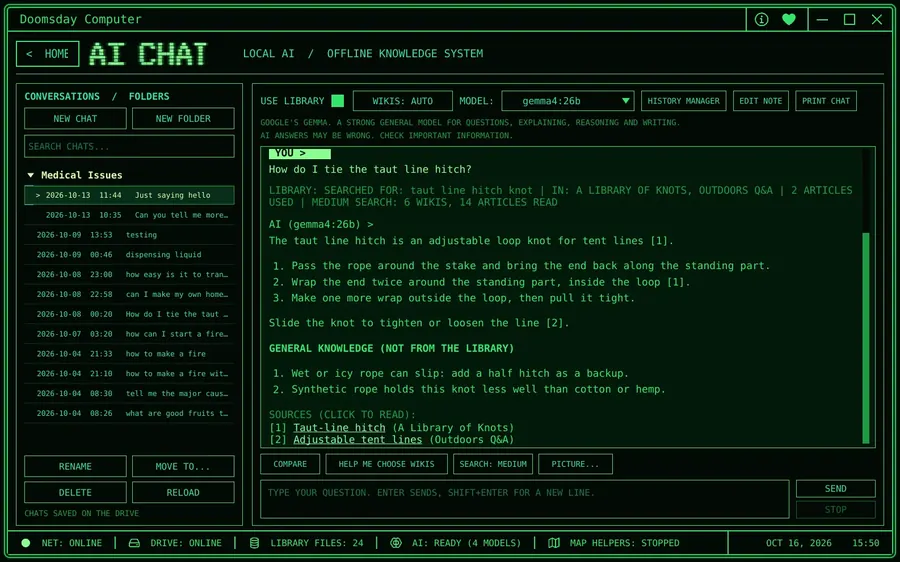
An AI that cites its sources
A language model on your own machine. It searches the library first, answers with numbered citations, and separates book knowledge from its own.
3 · MAPS
Directions without a signal
Street maps of your state or country. Address search, turn by turn routes, satellite and hill shading for the areas you choose.
4 · EMERGENCY INFO
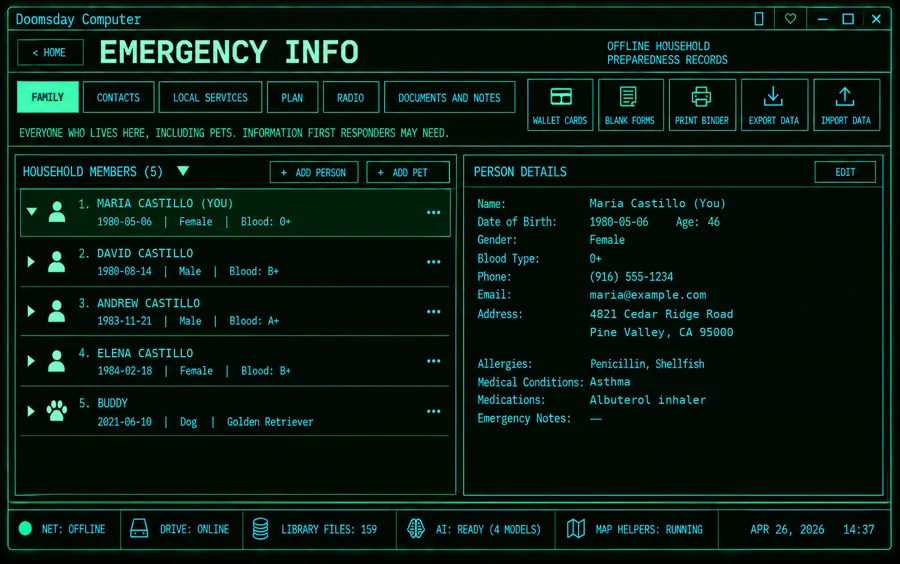
Your household binder
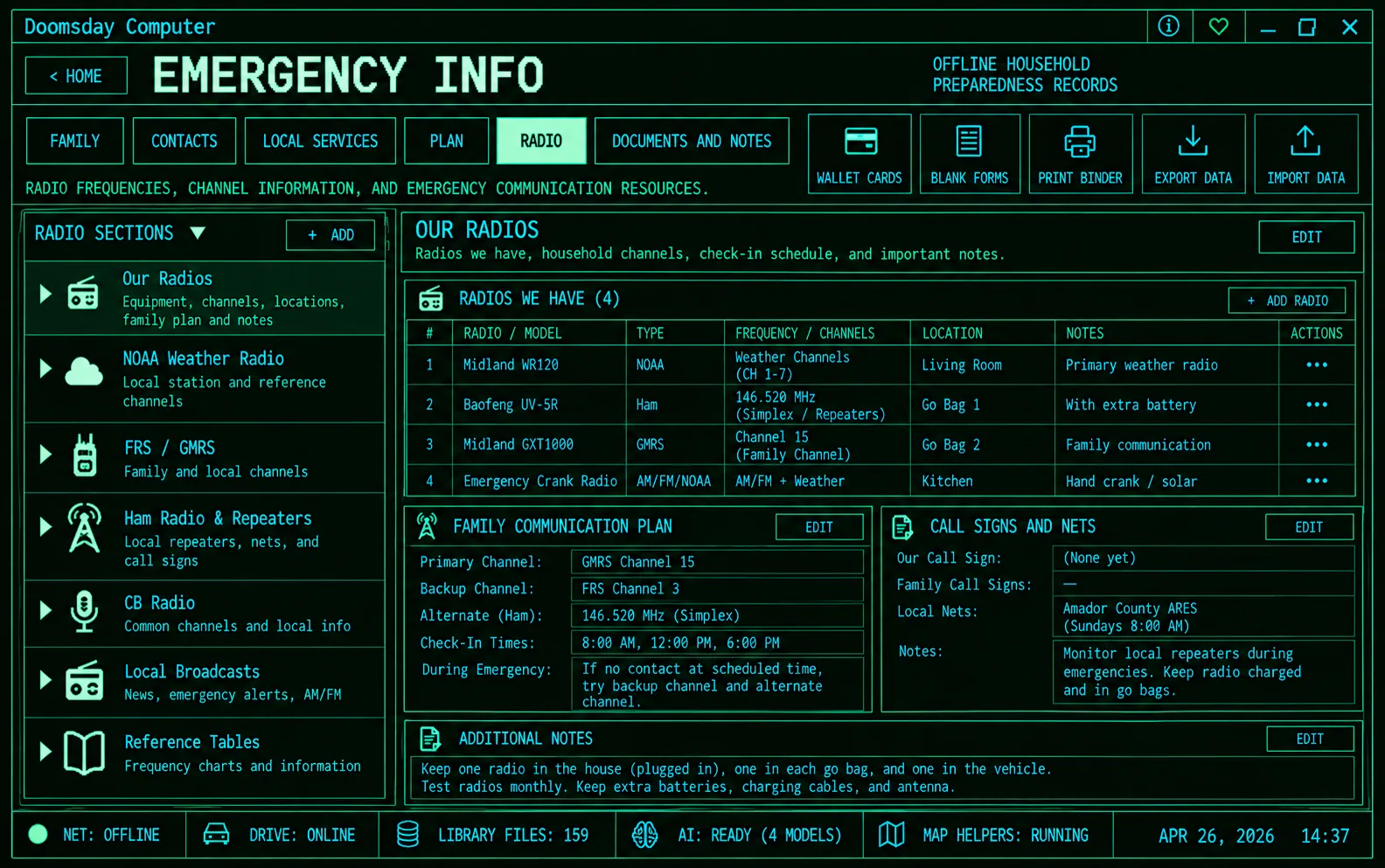
Family, contacts, local services, meeting places on the map, radio plan, documents. Print wallet cards or the whole binder.
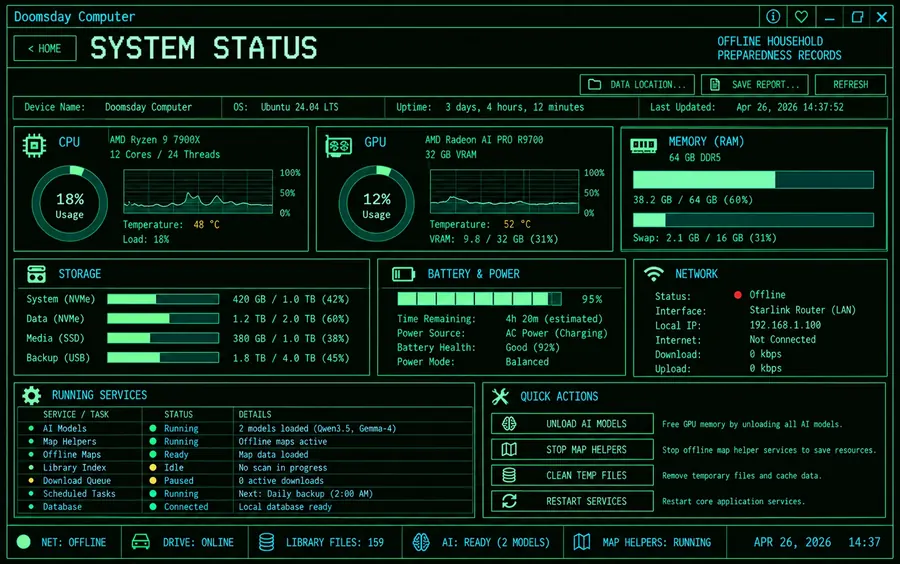
5 · SYSTEM STATUS
Know it's ready
Drive, battery, GPU, memory and every helper service on one page, so the machine is healthy before you need it.
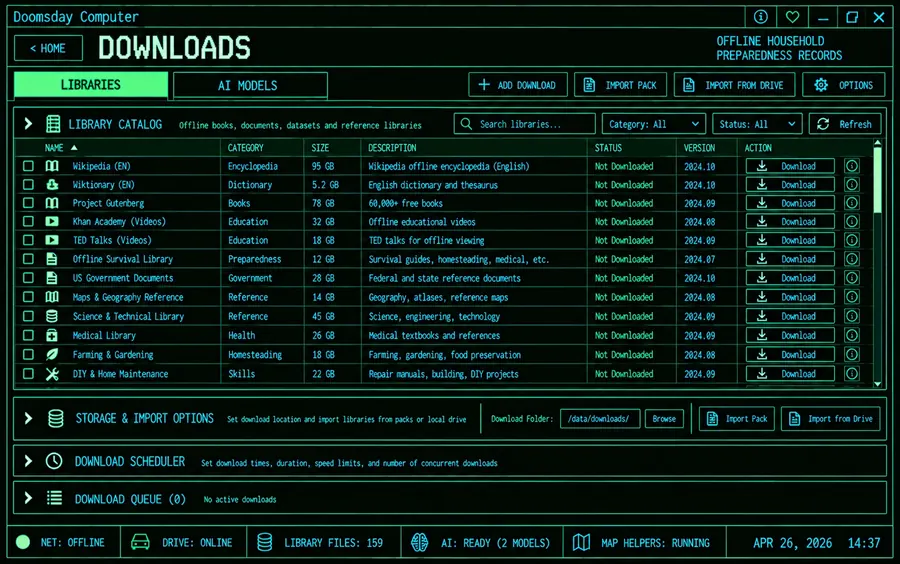
6 · DOWNLOADS
Stock up while you can
Fetch and update libraries, maps and AI models while there is internet. Schedule it overnight. Import signed packs from a drive.
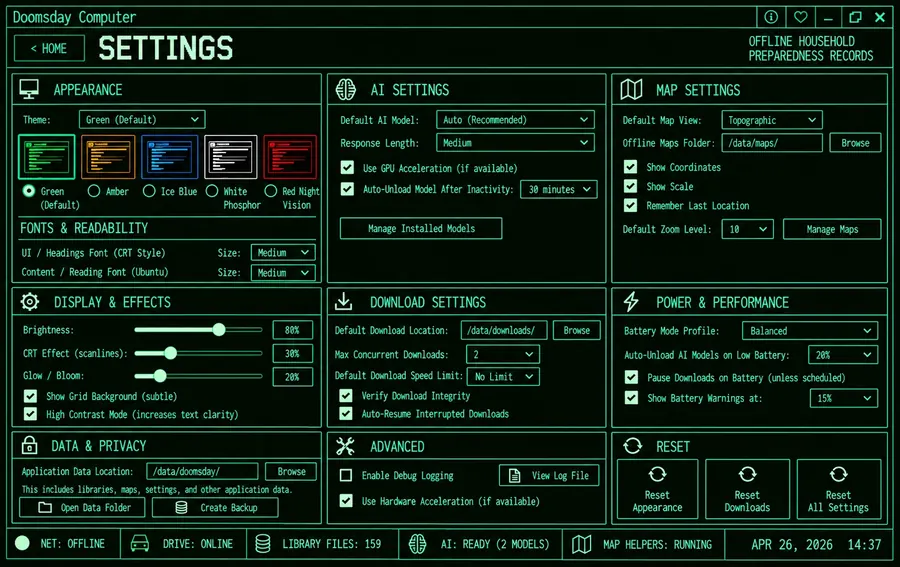
7 · SETTINGS
Five themes, your font sizes
Green phosphor, amber, ice blue, white, red night vision. Brightness, scanlines and glow are yours to set or switch off.
ALSO
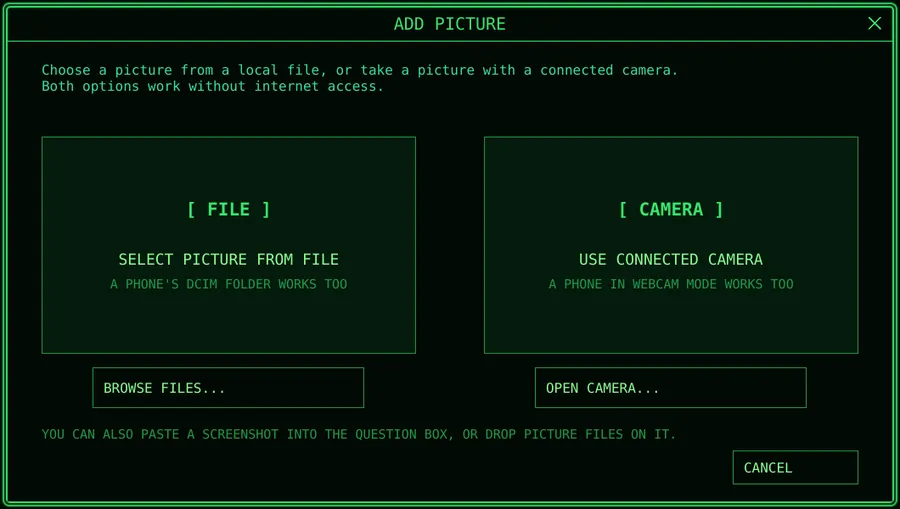
Pictures as questions
Point a webcam or your phone at a plant, a rash, a part number or a page of a manual. The AI looks and searches the library for it.
BUILT ON
Open source, credited
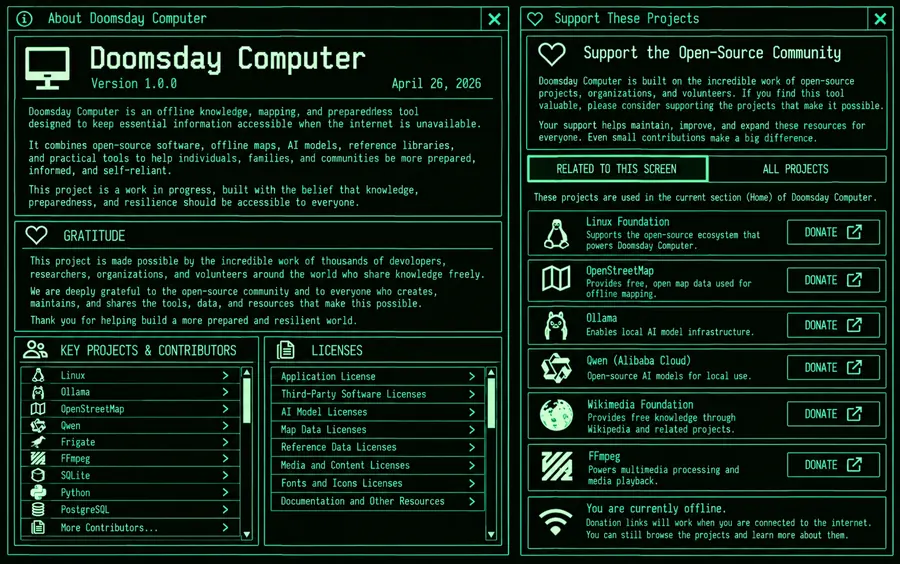
Linux, Kiwix, Wikimedia, OpenStreetMap, Ollama and the model makers. Every one is named in the app with a button to support them.
Some screens are design previews of the current build. Details change as each page is finished.
The libraries
164 collections, chosen by hand.
Every library on this list was picked because someone might need it when nothing else is available. Medical first, then survival, food, repair, radio, science and the classics. Take all of it, or only what fits your drive.
164Libraries
10Groups
866 GBEverything, largest versions
100 GBA strong starter set
Medical (11)14.7 GB
WikiMed Medical Encyclopedia, MedlinePlus, NHS' Medicines A to Z, Travelers' Health, Military Medicine, WikEM, MDWiki Medical Encyclopedia, Medical Library, WikiVet, Medical Sciences Q&A, Parenting Q&A
Emergency and self-reliance (22)27.3 GB
Ready.gov, Army Publishing Directorate, Post Disaster Resource Library, Water Treatment Library, Food for Preppers, A Library of Knots, Knots by Wikipedia, USDA Guide to Home Canning, True prepper, Urban Prepper, Canadian Prepper, Learning Self-Reliance, ScoutWiki, Appropedia, energypedia, CD3WD Project, Solar Powered LowTech Magazine, Hundred Rabbits, Restarters
Food, farming, animals, trades (17)4.4 GB
Gardening & Landscaping Q&A, Pets Q&A, Cooking Q&A (Seasoned Advice), The Great Outdoors Q&A, Homebrewing Q&A, Woodworking Q&A, Home Improvement Q&A, Motor Vehicle Mechanics, Bicycles Q&A, Sustainable Living Q&A, Lifehacks Q&A, Arts & Crafts Q&A, Gardenology, based.cooking LukeSmith, FOSS cooking, Public Domain Recipes, GrimGrains Recipes
Radio, electronics, power, building (14)9.5 GB
Amateur Radio Q&A, Arduino Q&A, Raspberry Pi Q&A, Robotics Q&A, Engineering Q&A, 3D Printing Q&A, Internet of Things Q&A, Drones and Model Aircraft Q&A, Signal Processing Q&A, Network Engineering Q&A, Earth Science Q&A, Electronics Q&A, OpenWRT, iFixit in English
Keeping the computer running (28)13.2 GB
Ask Ubuntu Q&A, Super User, Server Fault, ManKier - Linux man pages, Python Documentation, ArchWiki, Alpine Linux Wiki, Kris Occhipinti, Unix & Linux Q&A, Bash Docs, Python Docs, Git Docs, HTML Docs, CSS Docs, JavaScript Docs, SQLite Docs, Linux man pages Docs, C Docs, C++ Docs, Docker Docs, NumPy Docs, pandas Docs, Node.js Docs, Web APIs Docs, HTTP Docs, GCC Docs, GNU Make Docs, nginx Docs
Science, math and teaching (39)48.0 GB
Physics Q&A, Chemistry Q&A, Biology Q&A, Mathematics Q&A, Mathematics Educators Q&A, Science and Maths History Q&A, PhET Interactive Simulations, Milne Open Textbooks, Planet Math, ProofWiki, Biology Courses, OER4Schools, Wikibooks, Wikiversity, Wikipedia in simple English, Wiktionary in Simple English, Vikidia, Wikipedia 100, Chemistry by Wikipedia, Physics by Wikipedia, Mathematics by Wikipedia, Molecular & Cell Biology, Geography by Wikipedia, History by Wikipedia, Astronomy by Wikipedia, Computer by Wikipedia, Climate change by Wikipedia, Biology LibreTexts, Chemistry LibreTexts, Engineering LibreTexts, Geosciences LibreTexts, Humanities LibreTexts, K-12 Education LibreTexts, Mathematics LibreTexts, Medicine LibreTexts, Physics LibreTexts, Social Sciences LibreTexts, Statistics LibreTexts, Workforce LibreTexts
Old books (Project Gutenberg) (17)107.3 GB
Project Gutenberg by subject: Agriculture, Technology, Science, Medicine, Law, Education, English language, Military science, Naval science, Geography, anthropology, recreation, Social sciences, Political science, World history (Europe, Asia, Africa, Australia), Auxiliary sciences of history, Bibliography, library science, info resources, Philosophy, psychology, religion, General works
Maps and places (7)113.5 GB
United States of America, North America, World, OpenStreetMap Wiki, Wikivoyage, CIA World Factbook - 2020, Geographic Information Systems
Law and society (5)15.1 GB
Law Q&A, Economics Q&A, History Q&A, Wikisource, Best of Wikipedia
General reference (4)513.0 GB
Wikipedia, Survivor Library, Khan Academy (English - US curriculum), CrashCourse
Libraries are the free ZIM files published by the Kiwix project and the organizations that own the content. Doomsday Computer downloads them for you and keeps them updated; it does not change or resell them. Sizes are the largest version of each; most have a smaller version without pictures.
Choose a plan. The drive and laptop services use hardware you buy from Amazon, so the warranty is in your name and the price is Amazon's.
Ship the drive or laptop to us new and still sealed in its original box, with your order number. We email the address and a packing checklist.
We load, test and ship it back with a tracking number. Software and library packs are signed, so you can verify nothing was altered.
Plug in, open the lid, and unplug the internet whenever you like. Libraries and maps update later with one click.
We don't sell hardware. We sell the software and the hours it takes to load and test it. We only accept new, unopened hardware; for a computer you already own, choose the download. Ubuntu, the AI models, the maps and the libraries are open source or freely licensed, and the app's About screen credits every one of them.
Hardware
Any Ubuntu computer. These are the ones we test.
The software runs on most PCs that can run Ubuntu 24.04. The AI is the demanding part: more memory and a graphics card mean faster answers. The drive is where the library lives.
Approved drive
External SSD, 2 TB or 4 TB
Why
Holds the full library set, maps and models with room to grow. Solid state, so it survives a drop.
Works. Small models at reading speed on a recent processor; larger models take a minute or two per answer.
2 GB video memory
Too small to help. The model runs on the processor, same as above.
4 GB
Small models (4B class) fast.
6 to 8 GB
The 8B class models most people use, fast. Pictures work, slowly.
12 GB or more
26B class models and picture understanding at a comfortable speed.
The app picks a model that fits your hardware automatically. Figures are approximate and get updated as we measure more machines.
Minimum to try it: a 64 bit PC with 8 GB of memory, 60 GB free, Ubuntu 24.04. As an Amazon Associate we earn from qualifying purchases. Prices and models on Amazon change; the approved list is kept current here.
Questions
Before you ask the AI, ask us.
Does it really work with no internet?
Yes. Internet is used once, to download the software, the libraries, the maps and the AI models. After that you can remove the Wi‑Fi card if you want. The home screen tells you whether you are online, and everything on the menu works either way. When you are online, the Downloads page can fetch updates.
What is the AI, and who is reading my questions?
Nobody. The AI is an open model (Gemma, Qwen, Llama and others) running on your own processor through Ollama. Your questions, your chats and your household records never leave the machine. There is no account and no telemetry.
How much space do I need?
The software and one AI model take about 10 GB. A strong starter library (all of medical, emergency, food, radio and repair) is under 100 GB. Full Wikipedia with pictures is 95 GB on its own. Every library, largest version, is about 866 GB. Maps are 1 to 4 GB per state. A 2 TB drive holds all of it.
What computer does it need?
A 64 bit PC that can run Ubuntu 24.04. 8 GB of memory is the minimum, 16 GB is comfortable, and a graphics card makes the AI several times faster. The Hardware section lists the machines we test on. It also runs on an old laptop or desktop you already have; the AI will just be slower.
Why are the libraries free but the software isn't?
The libraries are published by Kiwix, Wikimedia, MedlinePlus, Project Gutenberg and many volunteers, and they stay free. What you pay for is the software that ties it together (the reader, the search, the AI that cites its sources, the maps, the binder) and, if you choose a service, the hours of downloading, loading and testing. The About screen in the app credits and links every project it depends on, with a donate button for each.
Why don't you sell the laptop or the drive yourself?
So the warranty is in your name and the price is Amazon's. You buy the hardware, we do the work. If a drive fails in two years, you deal with the manufacturer, not with a middleman.
I don't like green. Can I change it?
Yes. Settings has five themes: green phosphor, amber, ice blue, white phosphor and red night vision. Try them on the demo at the top of this page. Scanlines, glow and brightness are sliders, and you can switch the effects off entirely for a plain, high contrast screen.
Can I add my own books, PDFs and notes?
Yes. Drop files into the library folder or import a pack from a drive. Your own documents are searchable by the AI the same way the libraries are. Chats are plain files you can back up or move to another machine.
Does it need a graphics card?
No. The AI runs on the processor if there is no graphics card, just slower: a small model answers at about reading speed on a recent CPU, a larger one takes a minute or two per answer. A card with 2 GB of video memory is too small to help, so the model runs on the CPU anyway. 4 GB fits the small models and runs them fast. 6 to 8 GB fits the 8B class models most people use. 12 GB or more runs the 26B class and understands pictures at a comfortable speed. The app picks a model that fits your hardware automatically, and 16 GB of system memory matters more than the graphics card for the libraries and the maps. These are approximate; the Hardware section has the machines we test on.
Can I send you a computer or drive I already own?
No. The drive and install services only accept new hardware, still sealed in its original box: drives, laptops and desktops. A used machine can hide problems we can't see or fix, and we don't open and work on personal computers. For a computer you already own, buy the download and install it yourself.
Is it Windows or Mac?
Ubuntu Linux today, on purpose: it is free, it runs on almost any hardware, and it will still install in twenty years. The parts underneath (Python, Qt, Ollama, Kiwix) also run on Windows and Mac, and a port is being evaluated. The full install service exists precisely so you never have to touch Linux yourself.
How do updates work?
When you are online, the Downloads page checks for newer libraries, maps and models and fetches them on a schedule you set. Offline, we can ship updates as signed packs on a drive. The software itself is updated with one command.
Community
Keepers of the archive.
Owners are building something together: curated library lists, regional map packs, radio frequency tables, tested hardware, and the know how that only comes from using the thing. Join the list and get it first.
New library packs and curated lists as they are released
Software updates and what changed
Field notes from other owners, added to the library itself
A few emails a month at most. Unsubscribe anytime.
The radio page. Frequencies, check in times and nets, shared by owners who run them.
About
Made in the Sierra foothills.
Doomsday Computer is built by SiniArch, a small creative technology studio run by an architect and filmmaker who lives where the power and the internet go out together.
It started as a personal project: one laptop that would still be useful after the modem died. It grew into a full system because the pieces already existed, scattered across the open source world, and nobody had put them in one place behind one clear screen.